


BLACK FRIDAY OFFERS ENDING SHORTLY
"Absolutely love this digital frame! The picture quality is crisp, and setup was a breeze. Perfect for family photos!"
10.1" AI Photo Restoration Frame
10.1" AI Photo Restoration Frame
Hurry! Sale ends in:
😲 World's First AI Magic Frame
🖼️ Old Photo Restoration
💾 Free & Unlimited Storage
✨ AI Magic Photos
BLACK FRIDAY LIMITED TIME OFFER
Couldn't load pickup availability

10.1" AI Photo Restoration Frame
Product Overview
Product Overview
This digital picture frame is a sleek, modern device designed to display your favorite photos with vibrant clarity. It features an intuitive touch screen for easy navigation, and supports both portrait and landscape modes for versatile photo presentation.
Specifications
Specifications
- Display Size: 10.1 inches
- Resolution: 1280x800 pixels (HD)
- Auto-Rotate: Supports both portrait and landscape orientations
- Connectivity: Wi-Fi enabled for easy photo sharing
- Storage: Comes with internal memory for photos and can support additional storage via USB or SD card
- App: Manage photos remotely via an accompanying app
- Design: Minimalist, white frame design
- Compatibility: Works with Android and iOS devices for seamless photo transfers
Important Notes
Important Notes
- Wi-Fi Setup: Ensure your Wi-Fi connection is stable during setup for smooth photo syncing.
- Photo Formats: Supports most common image formats like JPEG and PNG.
- App Download: You need to download the mobile app to send photos remotely.
- Power Source: Requires a power outlet to operate; not battery-operated.
- Brightness: Adjust the screen brightness manually or set it to auto for energy efficiency.
- Storage Limitations: While the internal memory is spacious, storing high-resolution photos might require external storage options.


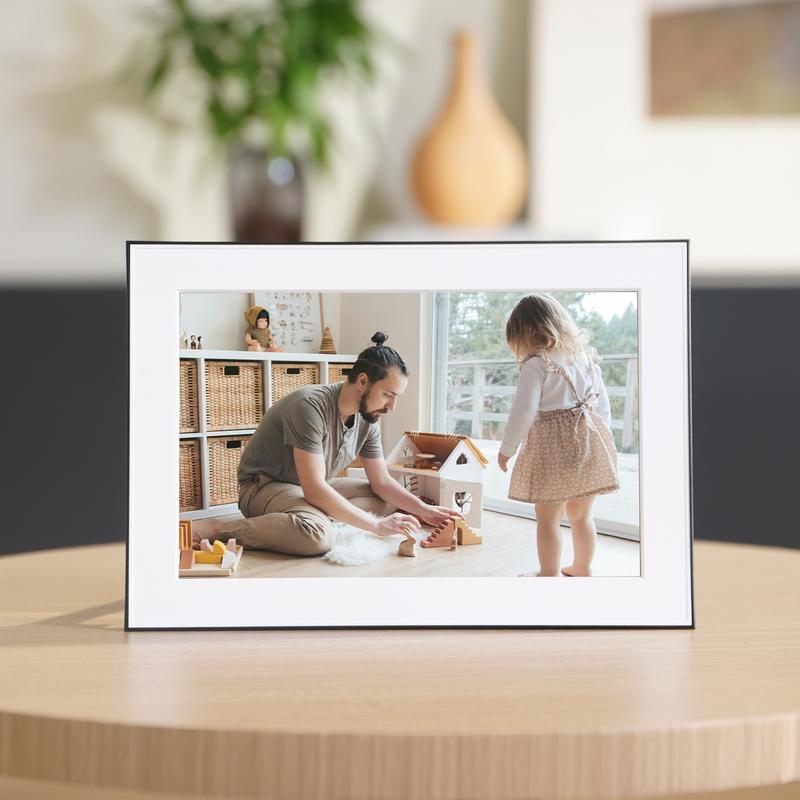
Smart Photo Display
Perfect Photo Display
-

Capture Memories
Display your best moments in vibrant HD.
-

Effortless Sharing
Send photos instantly via Wi-Fi.
-

Sleek Design
Modern frame, perfect for any room.
-

Smart Display
Auto-rotate and adjust for any photo orientation.


QYRENA
Instantly Share Memories
Effortlessly share your photos with friends and family. With Wi-Fi connectivity, send your favorite moments directly to the frame in seconds—no wires, no hassle.

QYRENA
Crisp, Vivid Display
Enjoy stunning clarity with the 10.1-inch HD display. Each photo comes to life with vibrant colors and rich detail, perfect for showcasing your most cherished memories.

QYRENA
Sleek, Modern Design
The minimalist frame seamlessly fits into any home or office décor. Its elegant white finish complements any room, adding a touch of style and sophistication.
Why Choose This AI Magic Frame?
When comparing digital photo frames, this 10.1″ 1080P frame stands out in several key areas

|
Others | |
|---|---|---|
| AI Photo Restoration | ||
| Unlimited Storage | ||
| Instant Sharing | ||
| Full HD Display | ||
| Sleek Design | ||
| Auto-Rotate | ||
| Easy App Control | ||
| Energy Efficient |
FAQs
How do I upload photos to the frame?
How do I upload photos to the frame?
You can upload photos via Wi-Fi using the dedicated app, or by inserting a USB drive or SD card.
Does the frame support videos?
Does the frame support videos?
Yes, the frame supports both photos and videos, allowing you to display your memories in dynamic formats.
Can I adjust the brightness and settings?
Can I adjust the brightness and settings?
Yes, you can easily adjust the brightness and other settings through the app or on-screen menu.
How does the AI photo restoration work?
How does the AI photo restoration work?
The AI technology automatically enhances old or damaged photos, improving clarity and details for a more vibrant display.
Is the frame easy to set up?
Is the frame easy to set up?
Yes, the setup process is simple, and the app guides you step by step to get your frame up and running quickly.
Can I change the frame’s orientation?
Can I change the frame’s orientation?
Yes, the frame can automatically rotate between portrait and landscape modes based on the photo orientation.
How do I connect the frame to Wi-Fi?
How do I connect the frame to Wi-Fi?
Follow the app's instructions to connect the frame to your Wi-Fi network. It’s a quick and straightforward process.
Is the frame compatible with both iOS and Android devices?
Is the frame compatible with both iOS and Android devices?
Yes, the app works on both iOS and Android devices for seamless photo sharing.
What types of memory cards does the frame support?
What types of memory cards does the frame support?
The frame supports standard SD and USB drives for additional photo storage.
Customer Favorites!
-

Absolutely stunning!
I’m beyond impressed with the photo quality! The colors are so vibrant, and the AI restoration made my old photos look brand new. It’s a great addition to my living room, and everyone loves it!
-

The best gift ever!
I gave this as a gift, and the recipient was thrilled! The ability to display all their favorite memories in such a stylish frame made it perfect for any occasion. Highly recommend!
-

Easy to use and beautiful
Setup was super easy, and I love how sleek and modern the design looks in my home. The picture quality is outstanding—so clear and sharp. I’m hooked!
-

A game-changer for my photos!
I’ve never seen my photos look this good! The AI enhancement truly brings out hidden details. It’s incredible how easy it is to upload photos straight from my phone. Couldn’t be happier.
-

Perfect for displaying family memories
This frame is fantastic for showing off family photos. The high-quality display makes everything look crisp, and the cloud storage means I never have to worry about running out of space!
-

Amazing quality!
The resolution is amazing, and the auto-rotate feature is so convenient! I love how effortlessly the frame blends into my home décor. It’s a must-have for anyone who loves to showcase photos.


